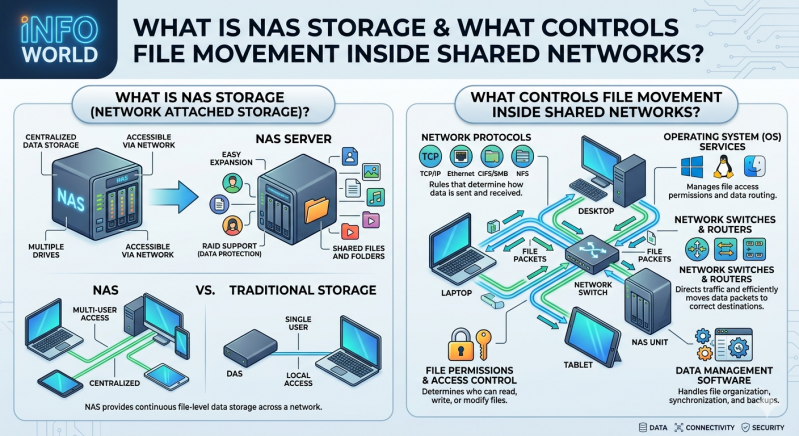
As data generation accelerates within enterprise environments, managing file access across multiple endpoints becomes a critical operational requirement. Organizations require centralized, highly available repositories to ensure continuous workflow operations. This requirement leads network administrators directly to the question: What is NAS storage, and how does it function within a complex IT infrastructure?
Network-Attached Storage (NAS) represents a dedicated file-sharing architecture. It allows multiple users and heterogeneous client devices to retrieve data from a centralized disk capacity. Unlike direct-attached storage (DAS), which limits accessibility to a single host machine, NAS operates over a standard Ethernet connection. Furthermore, it differs from a Storage Area Network (SAN), which provides block-level access to data. NAS provides file-level access, making it highly efficient for unstructured data such as documents, images, and video files.
This article explains the technical mechanics behind file movement in shared networks. We will examine the underlying network protocols, the hardware components involved, and how specific NAS storage solutions maintain data integrity and security across distributed environments.
The Core Architecture: What is NAS Storage?
To fully grasp network data management, administrators must first answer the fundamental question: What is NAS storage at the architectural level? At its core, Network-Attached Storage is a purpose-built computing appliance. It contains one or more storage drives, a central processing unit (CPU), random access memory (RAM), and a specialized operating system designed exclusively for file serving.
These devices connect directly to a network switch or router, operating independently of traditional application servers. By offloading file-serving duties from general-purpose servers, organizations reduce processing overhead and improve overall network efficiency. The specialized operating system within these devices handles data storage, file system management, and user access authorization systematically. Popular file systems utilized within these appliances include EXT4, BTRFS, and ZFS, each offering varying levels of data deduplication, snapshot capabilities, and corruption protection.
Mechanics of File Movement in Shared Networks
Data does not move randomly across a shared network infrastructure. Strict protocols and file systems govern every read, write, and modification request. When a client machine requests a file, the system must process the command, locate the physical data blocks on the disk array, and transmit the payload back through the network layer.
Network Communication Protocols
The movement of files relies on standard network protocols operating at the application layer of the OSI model. These rules dictate how client devices and storage appliances communicate, authenticate, and transfer data packets.
- Server Message Block (SMB) / Common Internet File System (CIFS): Primarily utilized in Windows environments, SMB facilitates file sharing, printer access, and inter-process communication. Modern versions (SMB 2.0 and SMB 3.0) offer significant performance enhancements, including multichannel support and end-to-end encryption.
- Network File System (NFS): Standardized for UNIX and Linux systems, NFS allows a user on a client computer to access files over a network much like local storage. It operates seamlessly in the background, making remote directories appear seamlessly integrated into the local file system.
- Apple Filing Protocol (AFP): Although largely deprecated in favor of SMB in modern macOS environments, AFP historically managed file movement for Apple hardware and is still supported by legacy infrastructure.
Access Control and Permissions
Security protocols control file movement just as much as transport protocols do. Enterprise-grade NAS storage solutions integrate directly with directory services like Microsoft Active Directory (AD) or Lightweight Directory Access Protocol (LDAP). This integration ensures that only authenticated users possess the necessary permissions to read, write, or execute specific files. File movement is immediately blocked at the network level if a user lacks the cryptographic credentials to access the requested directory.
Hardware Components Driving Data Transmission
The physical infrastructure dictates the speed, latency, and reliability of file movement. The processing power of the appliance determines how many concurrent connections it can handle without packet loss or severe degradation in throughput.
High-performance NAS storage solutions utilize Gigabit, 10-Gigabit, or even 25-Gigabit Ethernet interfaces to prevent network bottlenecks. Link aggregation (bonding multiple network interfaces together) provides both failover redundancy and increased bandwidth.
Additionally, the internal storage configuration usually involves a Redundant Array of Independent Disks (RAID). RAID setups duplicate or stripe data across multiple physical drives. For example, RAID 5 uses block-level striping with distributed parity, allowing the system to withstand a single drive failure without losing data. RAID 6 utilizes double distributed parity to withstand two simultaneous drive failures. This approach improves read/write performance while safeguarding the network against catastrophic hardware failures, ensuring file movement remains uninterrupted during hardware degradation.
Evaluating NAS Storage Solutions for Your Network
System administrators must evaluate their specific operational requirements when reviewing NAS storage solutions. Small offices might only require desktop-sized appliances with two to four drive bays and basic file-sharing capabilities. Conversely, enterprise environments demand rack-mounted NAS storage solutions featuring high-availability clustering, automated data tiering, and disaster recovery replication across geographic regions.
Before implementation, IT teams frequently ask: What is NAS storage going to achieve for our specific workflow? If the goal is high-speed 4K video editing, the solution requires all-flash NVMe storage arrays and massive network bandwidth to sustain sequential read speeds. If the objective is long-term archival and compliance, high-capacity mechanical hard drives combined with robust data deduplication software will suffice. Evaluating these technical factors ensures the deployment aligns directly with workflow requirements and budgetary constraints.
Furthermore, modern NAS storage solutions often include native cloud synchronization. This feature allows local files to automatically replicate to public cloud providers like Amazon Web Services (AWS) or Microsoft Azure, creating a hybrid storage environment that protects data against localized physical disasters.
Optimizing Your Network Storage Architecture
Effective data management requires a structured approach to hardware deployment, network configuration, and ongoing maintenance. Understanding exactly what is NAS storage and the underlying mechanisms controlling file movement allows IT professionals to build resilient, highly scalable infrastructures. By centralizing data access, enforcing strict protocol-based communication, and implementing hardware redundancy, organizations secure their critical information assets.
To improve your current architecture, begin by auditing your network bandwidth and evaluating user access patterns. Identify potential bottlenecks within your existing file-sharing methods, paying close attention to peak usage hours. From there, you can research and deploy specialized NAS storage solutions tailored to handle your specific throughput and capacity requirements. Implementing these systems correctly ensures continuous, secure, and highly efficient operations across your entire enterprise network.
Add comment
Comments