As organizational data demands expand, IT administrators face the ongoing challenge of maintaining seamless, secure, and rapid file access across diverse hardware ecosystems. Traditional Direct-Attached Storage (DAS) models often create isolated data silos, limiting cross-platform collaboration and complicating backup protocols. This operational bottleneck necessitates a shift toward network-centric architectures.
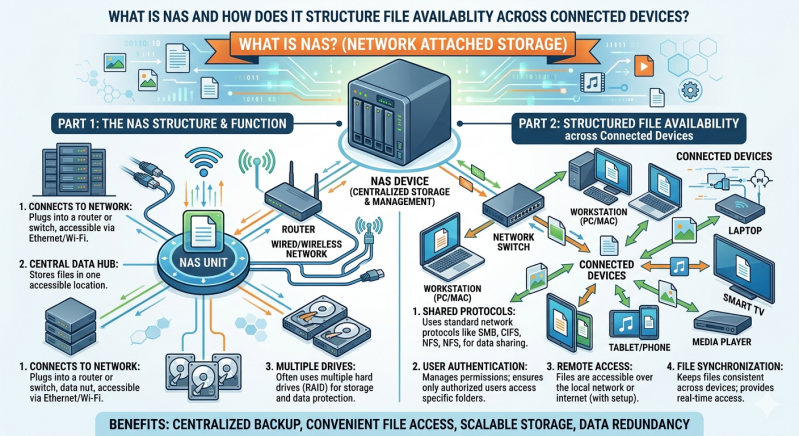
For those evaluating infrastructure upgrades, a common starting point is asking: What is nas, and how does it function within a modern network? Network-Attached Storage (NAS) operates as a dedicated file-level storage architecture connected to a localized or wide-area network. It provides centralized data access to heterogeneous clients, ranging from desktop workstations to automated server processes.
By utilizing standard network protocols, NAS storage solutions eliminate the need for direct physical connections to individual machines. This approach ensures that authorized users and client devices can access unified storage pools concurrently. The result is a highly efficient, scalable environment that prioritizes high availability and data integrity.
This article examines the structural mechanics of Network-Attached Storage. We will explore its underlying hardware and software architecture, the network protocols that facilitate file sharing, and how advanced configurations ensure continuous file availability across connected devices.
What Is NAS? Core Mechanics Explained
To fully answer the question of what is nas, one must look at its foundational components. A NAS device is essentially a specialized computer built for a single primary purpose: storing and serving files over a network. Unlike general-purpose servers that run a wide array of applications, NAS systems utilize stripped-down, highly optimized operating systems focused entirely on file routing, storage management, and data protection.
The hardware of a NAS unit typically consists of one or more storage drives (HDDs or SSDs), a central processing unit (CPU), and random-access memory (RAM). The CPU handles file system processing and network traffic routing, while the RAM caches frequently accessed data to reduce latency. By consolidating these components into a single appliance, NAS storage solutions provide an organized, single point of access for all network users.
Furthermore, these systems connect to the network infrastructure via standard Ethernet interfaces. Advanced NAS storage solutions often incorporate multiple Gigabit or 10-Gigabit Ethernet ports to support link aggregation. This network bonding increases total throughput and provides failover redundancy, ensuring that a single cable failure does not disrupt file availability for connected devices.
How NAS Structures File Availability?
The primary advantage of deploying a NAS architecture is its ability to seamlessly structure and distribute files across multiple devices, regardless of their underlying operating systems. This is achieved through a combination of standard communication protocols and internal data redundancy configurations.
Network Protocols for Cross-Platform Access
For a storage device to serve files to Windows, macOS, and Linux clients simultaneously, it must speak their respective network languages. NAS systems achieve this cross-platform availability by utilizing standardized file-sharing protocols.
The Server Message Block (SMB) protocol, also known as Common Internet File System (CIFS), is the native file-sharing protocol for Windows environments. It allows Windows clients to read, write, and request services from the NAS as if the storage were a local hard drive.
For Unix and Linux systems, the Network File System (NFS) protocol is the standard. NFS enables seamless mounting of remote directories, providing native-level performance for server-to-server data transfers. By running these protocols concurrently, NAS storage solutions act as a universal translator, ensuring that a file uploaded from a macOS workstation is immediately accessible to a Windows desktop or a Linux server without requiring manual data conversion.
Centralized User Permissions and Security
Structuring file availability requires strict access control. NAS systems integrate directly with directory services like Microsoft Active Directory (AD) or Lightweight Directory Access Protocol (LDAP). This integration allows IT administrators to define granular permission hierarchies.
Through these directory services, the NAS controls exactly which users, groups, or specific connected devices can view, modify, or delete specific files. Centralizing these permissions ensures that data remains highly available to authorized personnel while simultaneously restricting unauthorized lateral movement within the network.
RAID Configurations for Data Redundancy
A critical aspect of structuring file availability is ensuring that hardware failures do not result in data loss or downtime. To answer what is nas redundancy, we must examine Redundant Array of Independent Disks (RAID) technology.
Multiple physical drives are typically pooled into a single logical volume using various RAID levels. For example, RAID 1 mirrors data perfectly across two drives, ensuring continuous availability if one drive mechanically fails. More advanced configurations, such as RAID 5 or RAID 6, distribute data blocks and parity information across three or more drives. If a hard drive fails in a RAID 5 array, NAS storage solutions use the remaining parity data to mathematically rebuild the missing files in real time. This structural resilience guarantees uninterrupted file availability for all connected devices during a hardware fault.
Frequently Asked Questions
What is nas used for in an enterprise environment?
In enterprise environments, NAS is utilized for centralized file sharing, automated localized backups, virtualization storage, and disaster recovery. It provides a secure, localized repository for critical business documents, allowing multiple departments to collaborate on large datasets without overwhelming the primary application servers.
How do NAS storage solutions differ from SAN?
While both provide network-based storage, they operate at different data levels. A Storage Area Network (SAN) delivers block-level storage, making the remote storage appear to the client OS as a raw, unformatted local disk. Conversely, NAS provides file-level storage, managing the file system internally and presenting ready-to-use files and folders to the client over standard Ethernet protocols.
Can external users securely access files on a NAS?
Yes. Modern NAS units include secure remote access protocols such as Virtual Private Network (VPN) servers, encrypted FTP (SFTP), and HTTPS-based web portals. These features allow authorized remote workers to connect to the internal storage infrastructure securely, extending file availability beyond the physical perimeter of the local area network.
Optimizing Your IT Infrastructure with Network Storage
Structuring file availability across a vast array of connected devices requires a systematic, reliable approach to data management. By understanding exactly what is nas, IT administrators can move away from fragmented storage methods and implement a unified, highly resilient data architecture.
Through the use of standardized network protocols, centralized permission management, and hardware-level RAID redundancy, these systems ensure that critical data remains secure and accessible. As data scales and organizational workflows become increasingly collaborative, implementing robust NAS storage solutions provides the necessary foundation for efficiency, security, and sustained operational continuity. Assess your current network topology, calculate your projected data growth, and determine which network-attached configurations align with your long-term infrastructure objectives.
Add comment
Comments