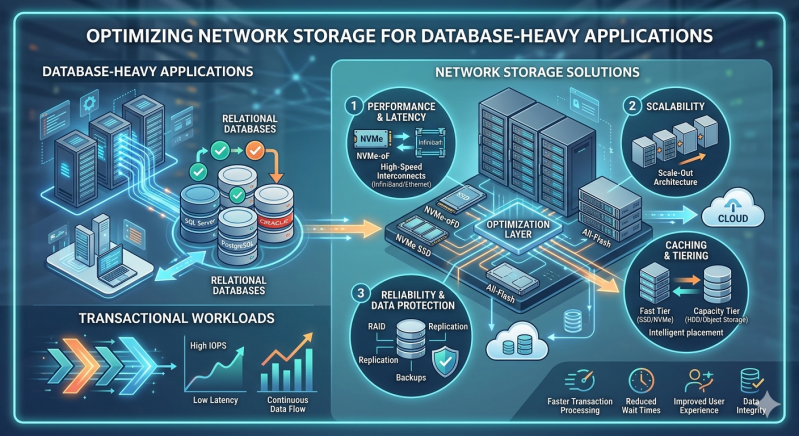
Database-heavy applications form the backbone of modern enterprise infrastructure. These systems require consistent high performance, low latency, and continuous availability to process millions of transactions efficiently. Failing to architect the underlying infrastructure correctly can lead to bottlenecks, data corruption, and catastrophic system failures.
Addressing these bottlenecks requires a systematic approach to infrastructure design. Administrators must analyze input/output operations per second (IOPS), throughput, and latency constraints specific to their applications. Upgrading processing power or expanding memory will not resolve issues if the data tier cannot read and write information rapidly enough to keep pace with the compute layer.
Selecting and fine-tuning the correct infrastructure directly impacts operational reliability. This guide examines how to configure and optimize Network Storage Solutions to meet the rigorous demands of transactional workloads. By implementing these structural adjustments, engineering teams can ensure their databases perform predictably under peak utilization.
Analyzing the Requirements of Transactional Workloads
Online Transaction Processing (OLTP) systems execute numerous short, fast transactions. These operations require immediate confirmation of successful data commits to maintain atomic, consistent, isolated, and durable (ACID) compliance. Consequently, the storage layer must process highly randomized read and write patterns without introducing delays.
High latency in OLTP environments directly degrades the user experience and can cause transaction timeouts. Systems managing financial records, inventory databases, or reservation platforms cannot tolerate these delays. Administrators must provision storage arrays that guarantee sub-millisecond response times while handling thousands of concurrent operations.
Deploying Effective Network Storage Solutions
Enterprises typically deploy Network Storage Solutions to decouple data from compute resources, enabling independent scaling and centralized management. The two primary architectures utilized are Storage Area Networks (SAN) and Network-Attached Storage (NAS). While SAN has traditionally dominated block-level database storage, advancements in high-speed networking have shifted the paradigm.
Modern Network Storage Solutions now offer comparable performance across both block and file-level protocols. Specifically, enterprise-grade NAS Storage systems configured with all-flash arrays can support intensive database workloads. By leveraging protocols like NFSv4 or SMB 3.0, organizations achieve high throughput and low latency without the administrative overhead of maintaining a dedicated Fibre Channel fabric.
Optimization Techniques for NAS Storage and SAN Environments
Achieving maximum performance from Network Storage Solutions requires meticulous configuration at both the hardware and protocol levels.
Implementing Flash Caching and Tiering
Mechanical hard drives cannot support the random I/O requirements of modern transactional databases. Implementing solid-state drives (SSDs) or Non-Volatile Memory Express (NVMe) drives is mandatory. Administrators should configure auto-tiering to ensure frequently accessed data remains on the fastest NVMe storage, while archiving less active data to higher-capacity drives. Furthermore, leveraging NVMe over Fabrics (NVMe-oF) significantly reduces the latency overhead traditionally associated with network protocols.
Optimizing Network Protocols
When deploying NAS Storage for databases, network protocol tuning is critical. Enabling Jumbo Frames (MTU 9000) reduces the CPU overhead required to process network packets, allowing for larger payload transfers per frame. Additionally, configuring multipath I/O ensures high availability and load balancing across multiple network interfaces. For NAS Storage deployments relying on NFS, enabling the "connect" mount option allows the Linux kernel to establish multiple TCP connections to the storage server, dramatically increasing parallel I/O capabilities.
Selecting the Appropriate RAID Level
Data redundancy cannot come at the cost of write performance in a transactional database. RAID 5 and RAID 6 introduce a write penalty due to parity calculations, making them unsuitable for database log files or highly active tablespaces. Instead, administrators must configure RAID 10 (striping and mirroring). This configuration provides the highest read and write performance while ensuring fault tolerance, aligning perfectly with the demands of database-heavy applications.
Scaling Your Storage Architecture
As database volume grows, Network Storage Solutions must scale without requiring disruptive migrations. Scale-up architectures involve adding disk shelves to existing controllers, which eventually leads to a compute bottleneck at the storage head.
Conversely, scale-out NAS Storage clusters allow administrators to add contiguous nodes containing both compute and storage capacity. This linear scaling model distributes the database workload across multiple controllers. When optimizing high-transaction environments, a scale-out approach ensures that adding capacity simultaneously increases the available IOPS and throughput.
Strategic Infrastructure Planning
Optimizing database storage is an ongoing operational requirement. Workloads evolve, data volumes expand, and transaction complexities increase. By accurately measuring baseline performance, selecting the appropriate hardware, and tuning network protocols, organizations can build a resilient data foundation.
Engineers must continuously monitor I/O metrics and adjust tiering policies to prevent latency spikes. Implementing these specialized configurations ensures your storage infrastructure will reliably support critical applications through periods of sustained growth. Evaluate your current storage metrics today to identify immediate opportunities for latency reduction and throughput enhancement.
Add comment
Comments